Turning "Career website" into a "Product" - from scratch.
My Role: UX Strategy • Product Strategy • Product management • Design Team Management

About the project
Phenom People is an HR tech company that provides a holistic HR solution to companies like Microsoft, Philips, Unilever, Booking and more.
In 2018 I had an opportunity to work on one of the most important company's projects - Productisation of the Career Site.
This was the main company's project in 2017-19 that directly reflects sales in particular and company success in general
My role:
In this project, I needed to wear many hats: Product manager, Product design team leader, and hands-on UX designer and Product designer
I had the opportunity to work on the Product business strategy, Product vision, Road map and actually Design and Craft the product step by step.
During the process, I closely collaborated with different stakeholders, the Phenom's CEOs (Mahe and Hari Bayireddi), Dev team, Customers, Sales department and of course guided and managed an international design team.
The challenge
Business problem:
In one sentence: There was too much Design & Engineering efforts (Money and Time investment) in order to deliver a brand new career site to a client. And the result...mehhhh tons of Bugs, Design issues, Broken UX and the whole process could take about 9 months and even more. Literally like bringing a new baby to the world:)
Product/UX problem:
Each time a new client acquired the Phenom platform, our Design team had to start designing the careers site from scratch. This meant a lot of prior meetings with the customer to define the strategy, then defining the information architecture, the design concept, and the content strategy.
Sometimes we got wireframes and design directions directly from the client.... and it didn't work, because usually, the client doesn't have a deep understanding of UI and UX design aspects. So, as a result, this led to a broken user experience which led to low KPI.
The solution: Career site Template
When the problem we wanted to solve was clear, we decided to solve it by making a Productisitaion of the Career site and to create a new Phenom product: "Career site Template".
These templates are based on the best UX practices and Fit almost Every Customer from Every Industry.
This way, we could decrease the time and effort of creating a new career site each time for our customers and also significantly increase sales and company growth.
Every template comes with Phenom CMS, where clients could change and update almost everything...similar to WIX.
It sounds like a great idea, right? It is! Now let's see how we actually did it.


Templates examples. UI Designer: Yael Sayag
The Research that led to the Product strategy
Market research, User research, and Competitive Analysis.
The first step as always - Research.
Yes, we have some hypotheses and ideas in our minds.
But in order to build a real Road map and define a product vision, first, we need to understand why we are bringing this product to market and what value it will provide to our user.
I planned and conducted User research: 1*1 User interviews and Usability tests. In addition, we spoke to our existing customers in order to understand their needs. We interviewed Phenom's sales and customer success teams in order to align with our company's goals. Lastly, we did a competitive analysis to explore the current ecosystem and to find opportunities in the market.
All of these helped me to understand the real problems and also to define the 3 personas we wanted to bring value to:
1. Jobseeker (User of the career site)
2. Customer (Microsoft, Phillips and etc)
3. Phenom People (Our Company's objectives)
User interviews helped me to understand the real user needs and problems. Based on user research I succeeded to build a User Journey Map.
*In the picture, I am interviewing Kieran, a US job seeker using Zoom Video call


Kogan Dima, UX Team Lead, Tel Aviv, Israel
Kieran Ricciardi, Job Seeker, Philadelphia, US
Defining a Product Vision:
Based on the user research and the competitive analysis I defined a product vision:
"Enable every job seeker to find the right job within minutes and to build a strong relationship with the employer brand by becoming a part of our growing talent network."
Building a road map:
We tried to focus on the problems we wanted to solve and not on the features in order not to fall into a build trap mode. So I built a Road map consisting of problems/needs we wanted to solve for our users, customers and our company.

I used Trello board to create a Product Road Map
UX Strategy
I defined the direction I wanted to follow:
To find the right job shouldn't be more complicated
than buying a t-shirt you want on Asos.
So, my UX vision/strategy become clear to me - To create the best in class, shopping like experience for our Career sites.
I invested a lot of time understanding the UX patterns in e-commerce platforms, focusing
on Search experience and personalization.
Some of the main e-commerce inspirations:


Design process
Defining the concept and wireframing
First, we defined the concept of the template based on these parameters: Company size, Company industry, Content strategy and etc. Then we started wireframing.
Building the Design System
The design system is the basis of every template. The holistic design system uses the same structure and variables, so it allows us to build career site templates fast and efficient and it decrease the implementation time and of course, reduces the number of bugs.
Design system style guide


UI Design
After we defined the style guide and the visual concept we designed the career site template pages, based on the wireframes.
During the design process, we found creative solutions in order to overcome any technical issues due to the limitations of the style guide, to create an up2date design.
Another challenge was to create templates that will look different in order to provide our customers with various options to choose from. We succeeded in creating 10 different templates that were chosen by +100 clients.
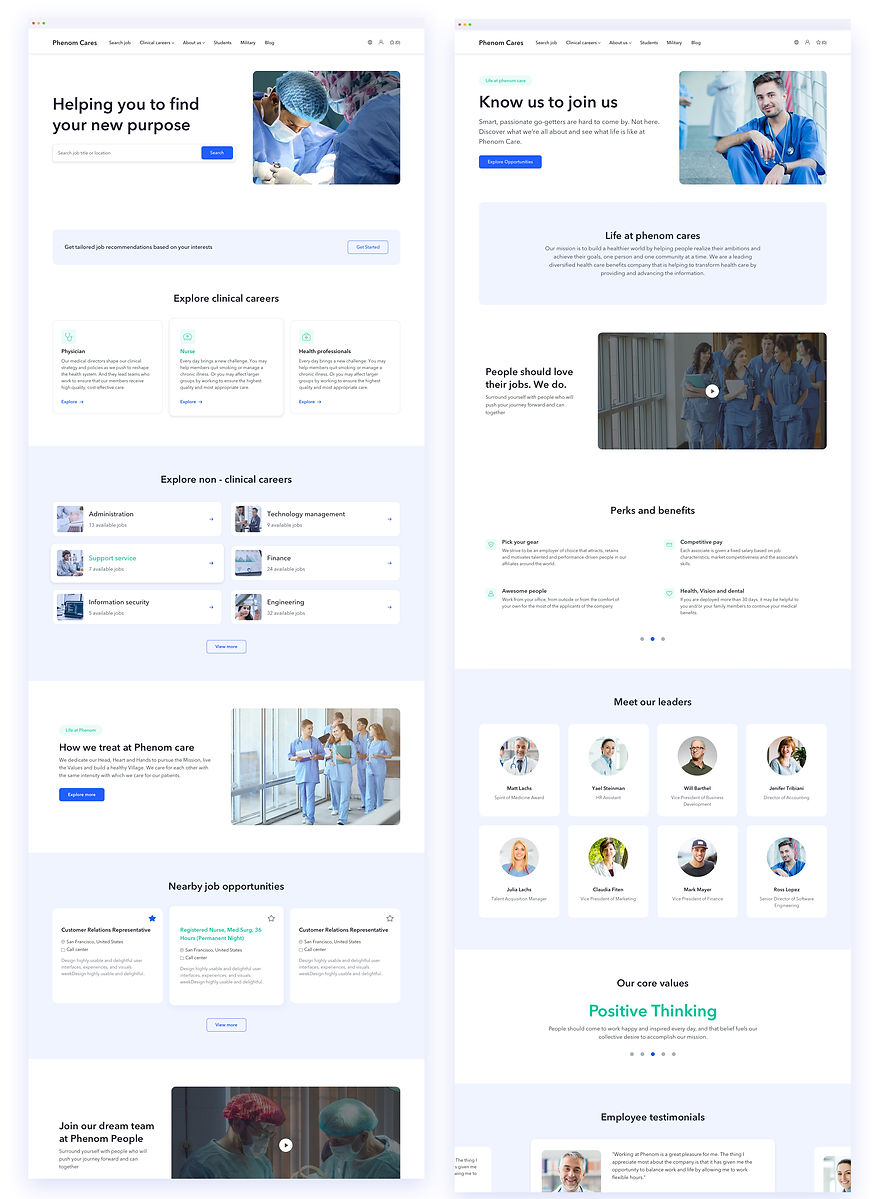
Template Design. UI Designer: Yael Sayag
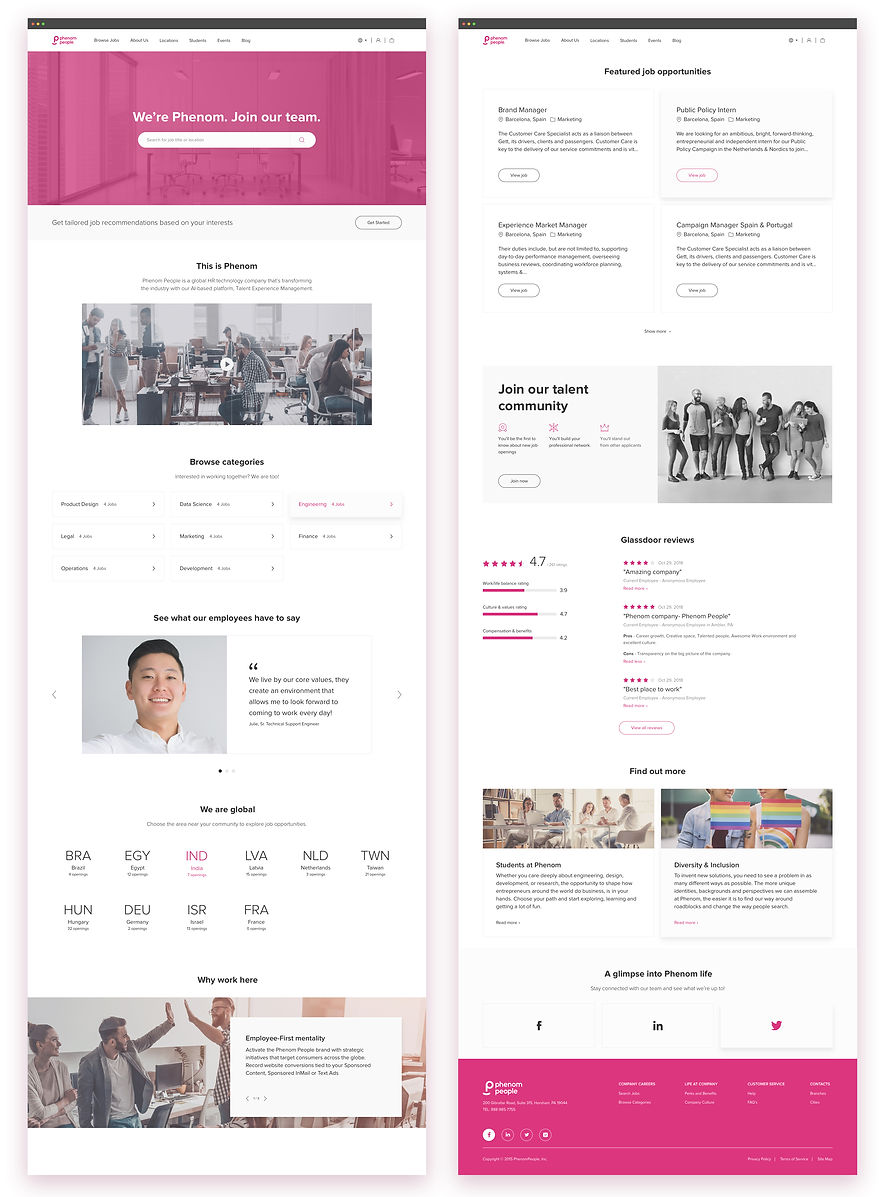
Template Design - UI Designer: Merav Katz
Amazing results we achieved with the
"Career site templates" product:
-40%
Implementation Time
x3
Completed Application Rate
+20%
Candidate engagement on site
+95%
Quality leads
Customers who chose our product
for their career sites:

More than 100 clients, including the biggest brands in the world, use our templates for their career sites.
Testing and Optimisations
Usability, A/B testing & Analytics:
Building a product from scratch is just the beginning of the journey. Now the real work begins.
Every quarter we conduct usability testing sessions in order to reveal bugs, usability issues, testing new features, and uncovering any other barriers that users face during their job search and application process on our career sites.
We use FullStory and internal A/B testing platforms that allow us to optimize our product based on data. In addition, we have an internal Analytics tool that also provides us with a lot of valuable data.
Based on the data we are getting from the research we are constantly improving our product by building new and enhancing the existing features.
Project learnings & takeaways
Strategy and research
Intuition is great, but not when you're developing a product.
Do research, collaborate, define the product strategy.
You can use a design sprint in order to define the product strategy and reveal the real needs and goals. Don't forget to involve all the stakeholders.
Cross-team collaboration
Communication and collaboration are of the most important skills I developed during the process. By involving and updating relevant stakeholders (Dev, Implementation, Sales, Product, UX, CEO) regarding the progress and future steps, you will save a lot of time and money for the company. Also, it is important that everyone will be aligned with the product strategy and the road map.
Be open to changes and experiments.
As a Product UX Manager and a Design Team Lead, I learned to be open, to listen and to accept different opinions from different people. I think that it is the power of the group that makes all the difference. At the end of the day, all of us have the same goal, but yes we can have different opinions.
Continuously updating the road map
The road map has to be dynamic. The market changes, your product changes (some times you even don't know it), technology changes, new people join your team, so it is helpful to review once every two months the road map and update it if needed. This is also a great opportunity to align everyone with the roadmap at the same time.
Build, Measure, Learn. Lean startup methodology.
Using lean startup methodology allowed us to get fast feedback on new features without investing too much time and money in building them. This helped us to answer the question: Should we build this feature?
Product optimization
After every release, we measure the result, refine, and improve the experience based on real data coming from analytics, usability testing, Fullstory. Yes, it is not easy to go back and improve the already built feature, but once you succeed in doing it, you'll see results, and next time it will be easier to convince the other stakeholders to do this.