Redesigning monday.com
permissions
My Role: Product design • UX Design • UX Research • Product management

Foreword
monday.com is getting larger.
We want to allow admins to set up the account permissions in a way that will reflect their business needs, their workflows and their culture.
By 2022 we are expecting to have more than 2000 large accounts. A large account is considered to have more than 200 users.
As a result, admins will require more control, clarity, confidence, and visability over a large number of users.
The Goal
Enable admins to easily manage access in a secure, granular,
scalable & clear way
Enable full control of privacy and security data
Provide full clarity on who can access what
Enforce at scale without reducing performance
Develop new permission control capabilities rapidly
Allow easy setup of account
The problem:
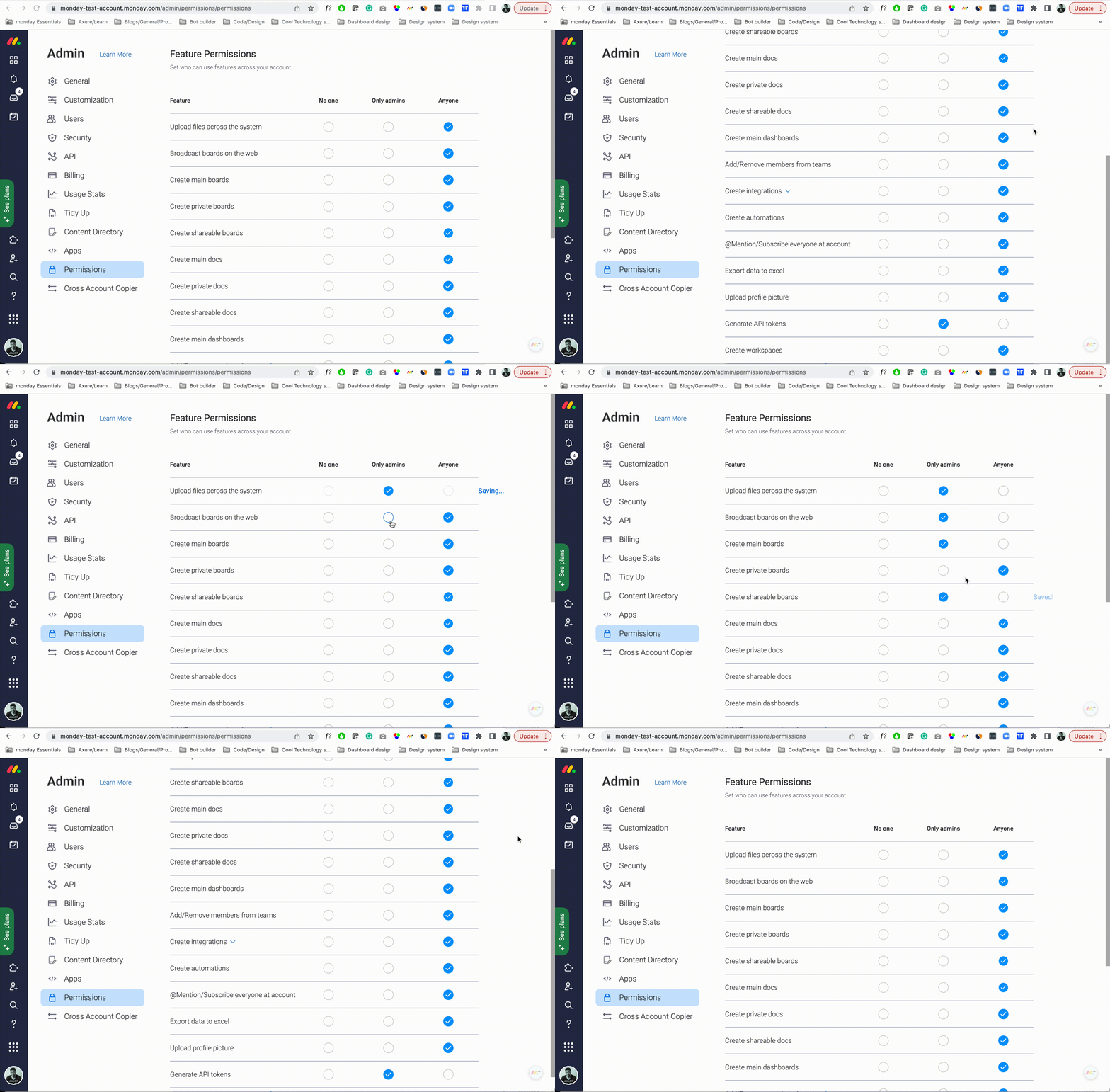
Limited functionality: admins can’t define what each role can and can’t do
Lack of clarity: "No one", and "Anyone" is not roles and are difficult to understand
Visibility and sense of control
The layout can't support many roles and it's not scalable
Current account permissions
The solution
Role-based access control (RBAC)
It is a method of restricting network access based on the roles of individual users
within an enterprise.
It will provide admins with the ability to control permissions by roles and admins will be able to create custom roles
Account roles can be default such as Admin, Member, Guest, and Viewer, or can be customized to the account-specific needs.
Examples of custom roles
Finance admin (Access the billing section)
IT admin (adding/removing users, handling login configuration, setting up SCIM)
Content admin (Create/Delete workspaces, Content directory)
Why
Client facing requests from Enterprise accounts
More user roles or custom role
An additional level of users for permissions other than Admin, non admin, anyone
Role-based permission management
KPI
The change rate of account permissions
Out of 4.9K EP accounts, 19% (963) have changed something in these settings
Reduce the number of tickets
Redesign - how it actually works
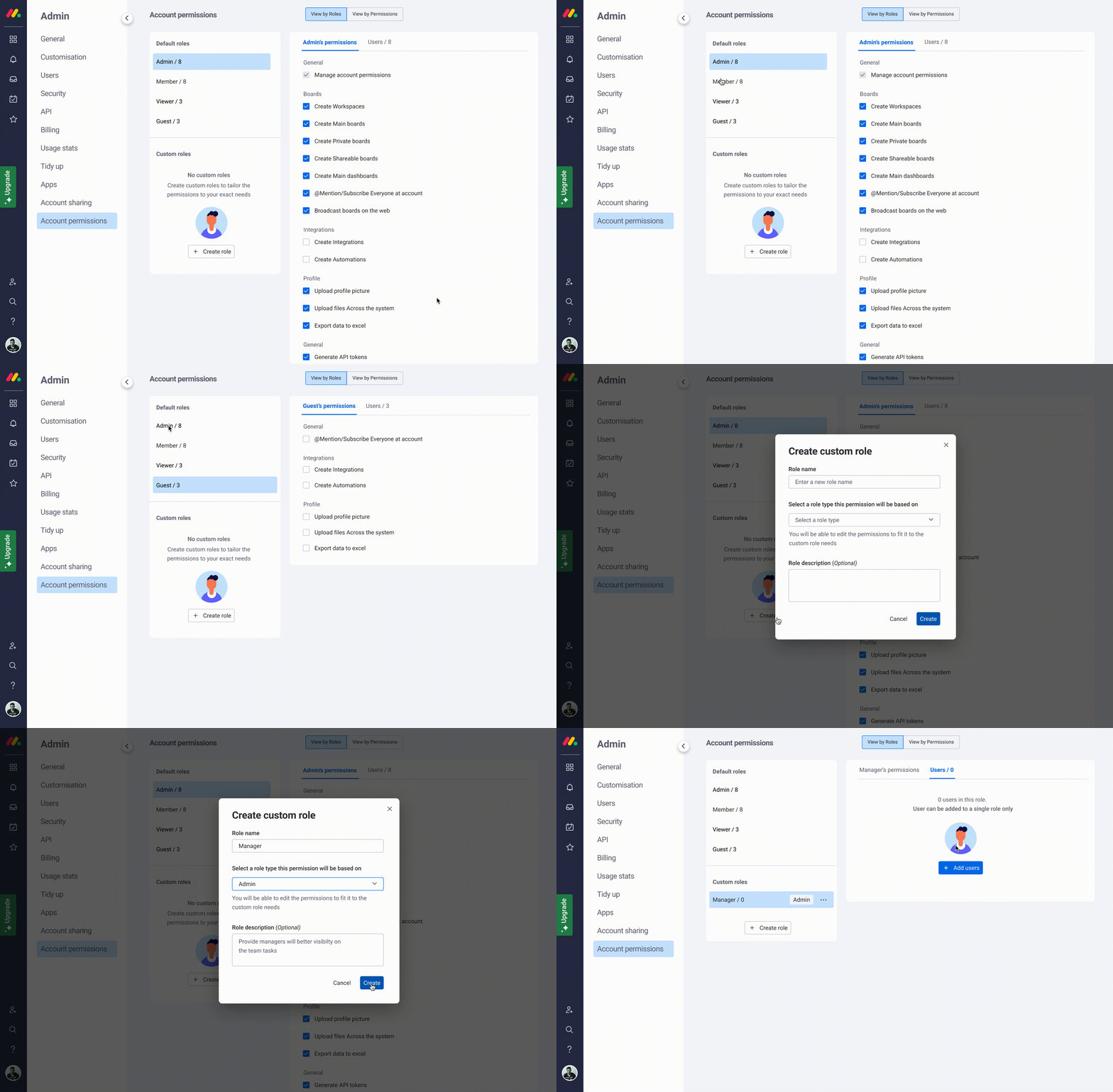
View by roles: What "Manager" role (which is a custom role based on Admin) can perform in the platform

View by roles: Here admin can see all the users that are assigned to the "Manager" role and manage it.

View by permissions - Here admin can search by permission and see what roles assigned to each of them

View by permissions - Here admin can see all of the users who can perform this specific permission

Next steps
Follow the data on our main KPI's and collect feedback from the customers who will get this feature.
Help users to understand why they can not perform actions that were restricted by Admin and how they can overcome this.
Stay tuned:)
Project learnings & takeaways
How to conduct competitors' research once you don't really have an access to the permissions area
My first step was to read the learning materials from different enterprise platforms, where I could see and understand their approaches and see some examples and how-tos. But it wasn't enough because I couldn't see the whole picture and also I was willing to speak with guys who really manage permission on the enterprise level.
So I found it in-house. I interviewed our IT team who actually manage monday.com permission on different enterprise platforms that we are using. In this way, I also could understand the permissions areas and speak with real users. I could understand their strong and weak areas, and hear some issues and frustration from their experience. It was super beneficial, I also conducted usability testing on our solution with these users.
Working closely with the dev team
First of all, this project has many technical aspects because the dev team first needed to build the infrastructure in order to support RBAC concept (Build a new authorization microservice with building blocks that will allow this new concept). Secondly, the dev people have a lot of input once it comes to the permission area. They are familiar with these areas from the tools that they are using and also they have a very logical state of mind that helped me to understand better the problem we want to solve. So it was really important to be aligned with the dev team and also learn their jargon:), so we could closely collaborate, have meaningful discussions and build the new solution together:)