Personalizing the job search experience
My Role: UX Design • Product Management • Product Design • Research

About the project
In order to improve the job search experience and provide users with meaningful personalized content that from one hand will help users to find the right job faster and on the other hand, will make them feel seen and important we start working on bringing this experience into a job search on the career site. We worked as well on the CMS (The backend management side) in order to provide and help HR/Content marketers to manage this experience for users, behind the scene.
Before we started this project, we were already doing some basic job recommendations based on user behavior, but we wanted to maximize the experience even further and make it really engaging and valuable.
My role:
I took part in defining the personalization strategy and led the project from UX and Product aspects.
I created multiple UX solutions to support the strategy, taking into account our AI and Machine learning capabilities.
In this project, I needed to understand and take into account different technological restrictions and product requirements, bearing in mind product complexities caused by different product connectivities and dependencies.
I spent a lot of hours speaking with our Dev team. I also flew to India to meet our dev team in person in order to move forward with this project as much as we can.
I was doing a lot of research-driven ideation, working on different use cases, planning and finally working on the UX solutions.
During the process, I collaborated closely with different stakeholders, the Product team, Dev team and of course guiding and managing my international Design Team that helped us to visualize our ideas.
The challenges
1. How might we get enough data to provide a hyper-personalized experience?
How can we get more qualitative data about the users during their session on the career site?
What kind of incentives will drive them to share their personal/professional data with us?
2. How might we provide a different user experience for different segments/visitors?
How do the different experiences across different segments look like? What exactly will be personalized and how?
3. How might we create a personalized experience across all of the products and solve the integration issues?
How will the integration work between the Career site the CRM? How will our Bot be effected? How will our customers be able to manage personalization settings through the CMS and etc?
The solution
We've started working on a new template that will showcase all of the personalization capabilities. This template incorporates personalized experience for different segments:
Stranger • Visitor • Lead • Qualified Lead • Applicant.
In addition to the Segmentation, we aligned our content to each step of the user journey with behavior-based personalization, personalization on-demand, and contextual personalization.
The Process
Segmentation:
As a first step, we decided on the relevant segments based on the user state within the user journey. Each state provided us with different amounts of data. Based on that, we could personalize the career site.

Mapping all of the assets for personalization
In order to understand the whole scope of the project, we mapped out all of the related assets for personalization. In this way, we were able to see a high-level picture and later on, we drilled down to the selected items we decided to focus on.

The deliverables
1. Personalisation on demand
We built a widget that collects in a short and intuitive way the professional data from the job seekers in order to provide them with a personalized experience. This widget became a great lead generator as well.
One of the challenges here was also to create a widget that we could be easily implemented across hundreds of existing clients (that each of them had different style guides) without a huge dev effort from our side. Here is an example of Foot Locker:
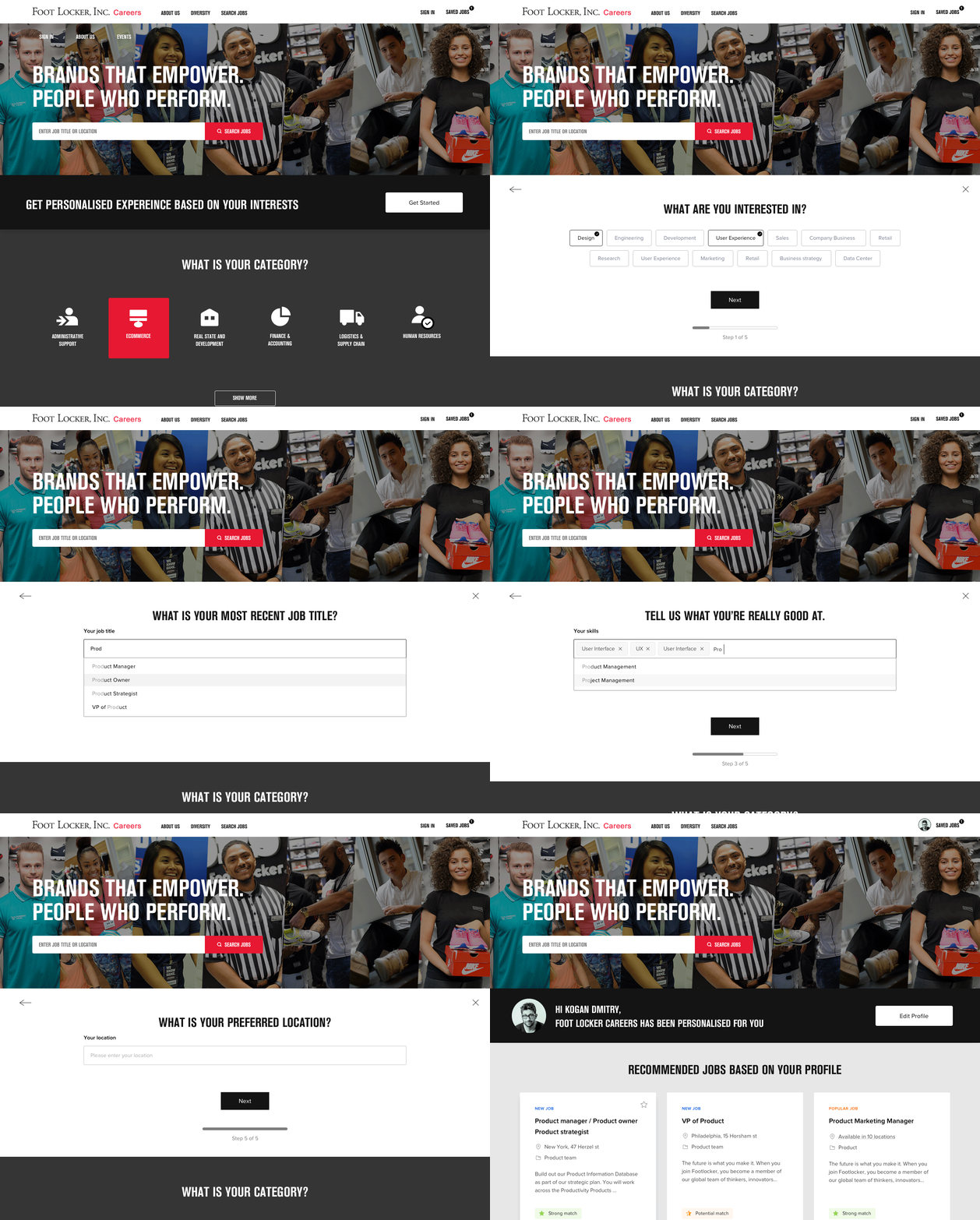
It took us only 1 month to implement it across hundreds of our clients
Each of our clients' career sites was designed based on a shared style guide therefor we could automatically implement this widget with minor effort from our side. Check out live examples from our clients:



2. Candidate profile
In order to support the personalized user experience, we created a candidate profile.
The candidate's profile has automatic sync with the data we have on the CRM in order to provide an optimal experience both for the user and for the recruiter, so everyone will stay updated with the most recent and relevant data.
In addition, there were a couple of problems we solved with Candidate Profile and provided the job seekers with real value:
1. Within the profile, the user can check his/her application status for each of the jobs he/she has applied.
2. Logged in users will get a personalized experience on any device at any time of day.
3. Users can configure and manage personalization settings, job alerts, saved jobs and etc.
4. Last but not least - Keeping information in the profile made the application process much faster and easier, almost with one click all the data would be automatically prefilled in the application form.
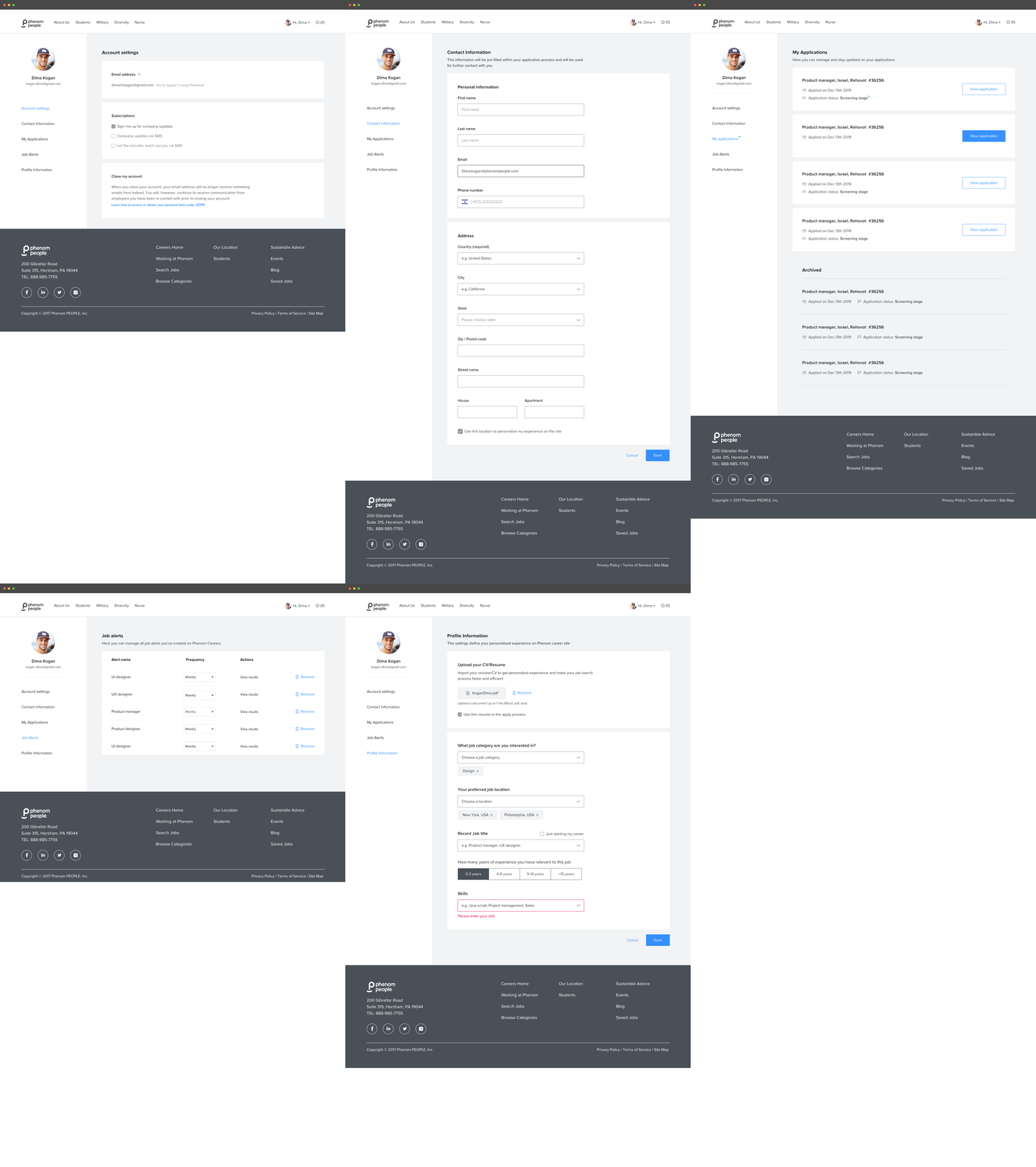
Candidate profile - Mobile and Web design


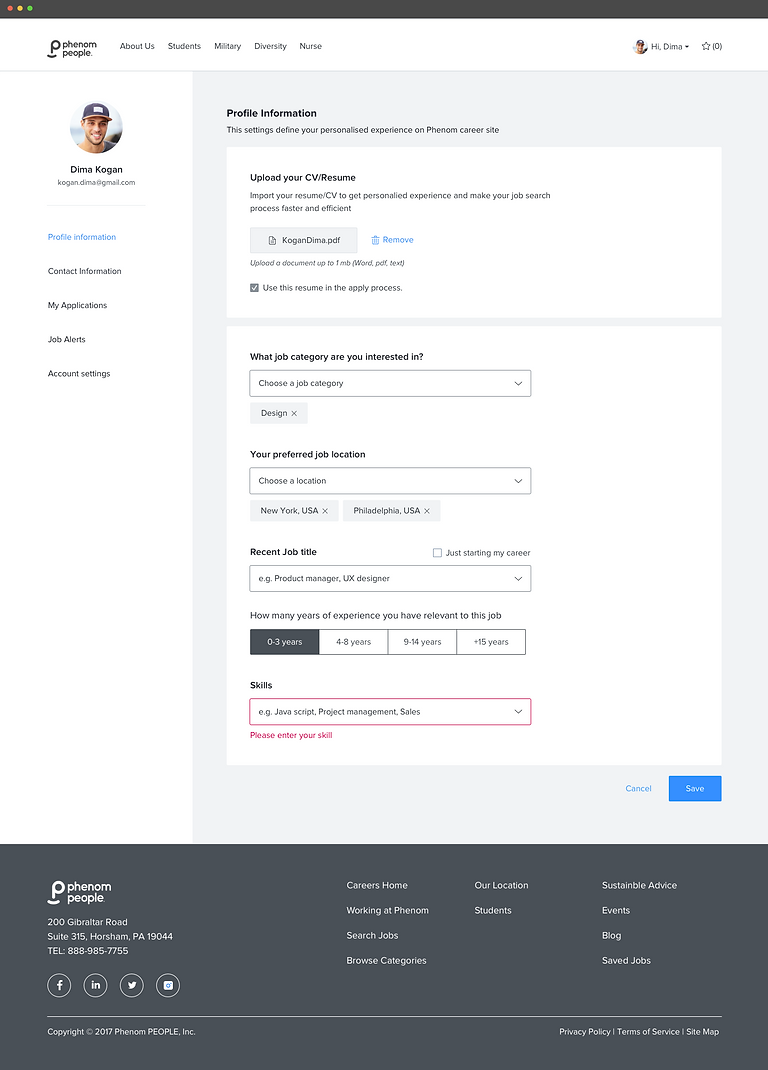
Candidate profile:
UX/UI design and Team Lead: Kogan Dima
UI Design: Yael Sayag
3. Prompting job seekers to create a profile
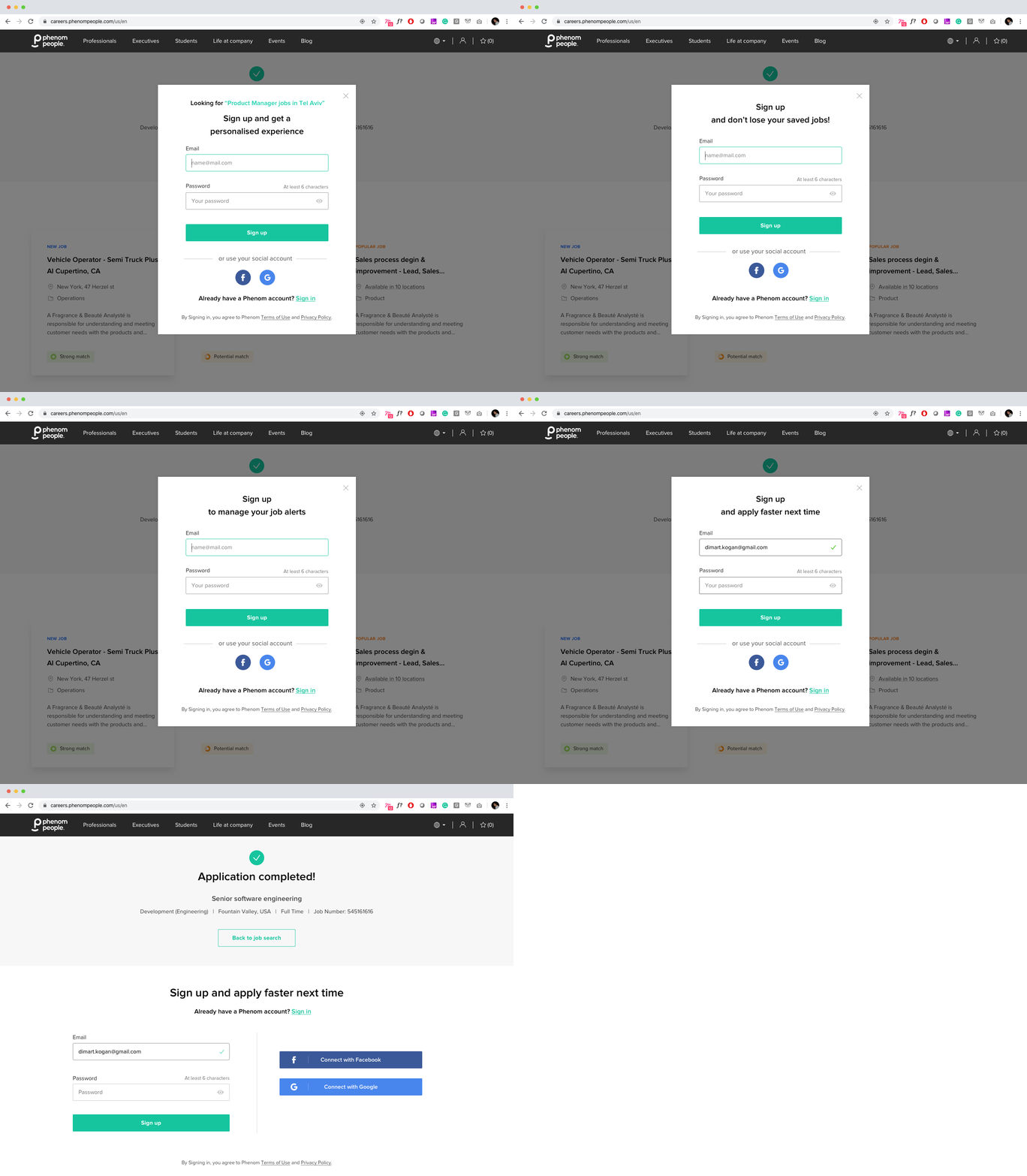
In order to prompt the job seekers to create a profile, we created personalized Sign-up
pop-ups/banners with relevant value propositions to the exact stage within the user journey.
We mapped some of the most critical touchpoints: After (x) number of saved jobs · After creating a job alert · After finishing the application process, and more.
Desktop solution
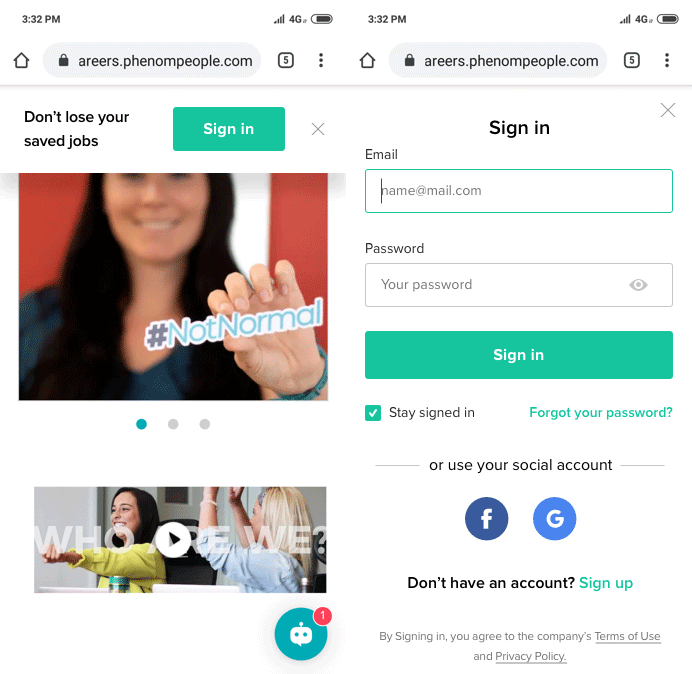
Mobile solution
We kept the pop-ups small on mobile, no more than 15% of the screen. In this way, we could provide a better user experience on mobile instead of disrupting the user with a pop-up that would cover most of the screen. Once a user intentionally clicks on the button he/she will be redirected to a full-screen sign-in page.
Personalized job recomendations
One of the core widgets is Personalised job cards.
Job cards as a widget contain different parameters of personalization:
1. Based on the user behavior on site
2. Based on user's professional data and profile
In addition, the job card itself includes different parameters of personalization
1. Match score label (How the user fits the job)
2. Personalized smart tags (Why user should consider this job)
As a first step, I mapped the parameters of personalization that could affect
the job card widget.
This helped me to understand the logic behind it, so I could discuss further with the dev team regarding the rules and the conditions of the personalized job card's appearance.

Eventually, we defined which "Job Recommendation widgets" will be presented for each of the user journey state:
Stranger • Visitor • Lead • Qualified Lead • Applicant.

The second step was to define the job card design.
First of all, we needed to define the job card content, bearing in mind different clients, different requirements and data. These job cards should work for every client with every data on it and should be easily implemented across hundreds of our clients...
So we designed it using Atomic Design Methodology.
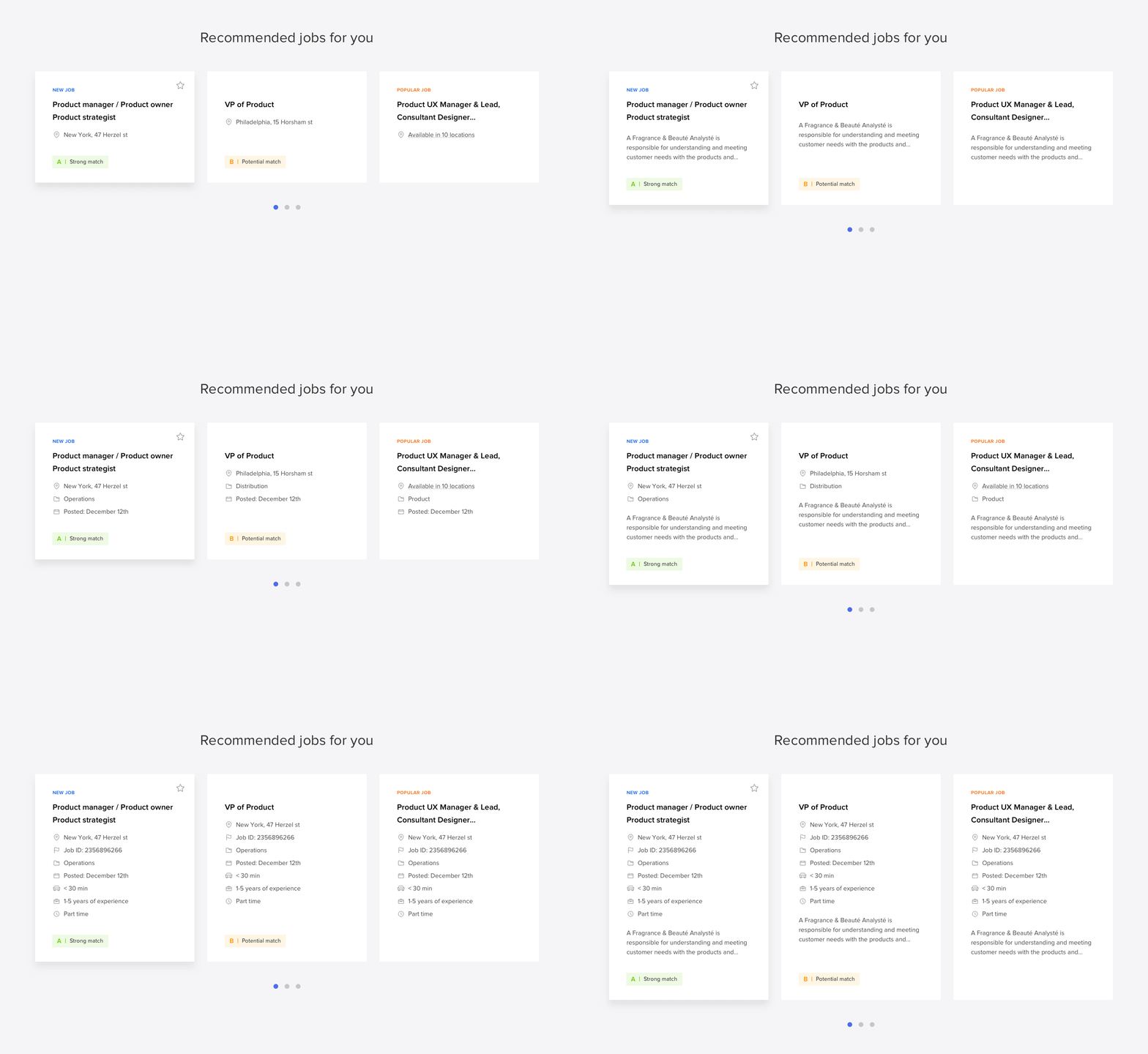
Job Match Score
The job match score is calculated based on the job seeker profile taking into account also the CRM data.
This match score labels provide a user with valuable information about their chances to get a job and helps them to decide faster whether to apply or not.
We have designed different match score labels to fit different clients, cultural and psychological differences. (For example in the US: A | Strong match reminds the US users of the school grading scale)
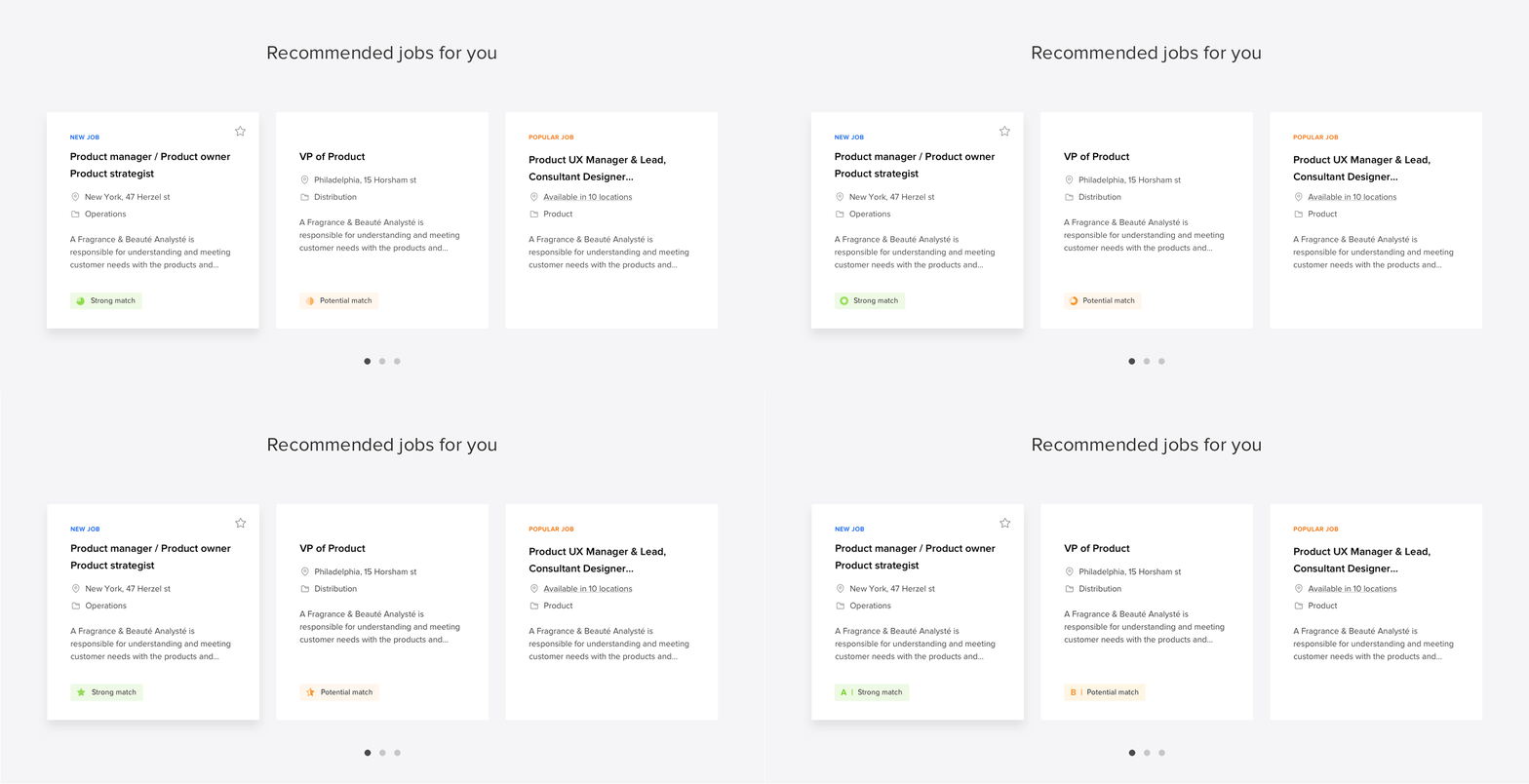
Job cards design:
UX\UI design: Kogan Dima • UI Design: Maya Yogev
Smart Tags
We created smart tags that will appear on the job cards that should help/encourage
the job seeker to make a decision. These tags use the Urgency/Scarcity method which is similar
to e-commerce patterns.
From the backend perspective, we tried to use this method only when it really brings real value.
For each of the tags, we defined the Tag appearance mechanism that should trigger them.
Here are some examples:
Opened Today • Recently opened • Be among the first to apply • “X” applicants • About to be filled • Nearby job • High demand • Popular job • “X” views • “X” connections work here • Part-time • Part-time • Entry-level • Internship • High salary/Top paying career • High growth potential
Personalised Pages:
Job description page, Search result and Home page
Page-level personalization:
We decided to focus on 3 main pages.
Each of them will get automatically personalized core widgets and views.
During the design process, we were constantly thinking about how personalization solutions could fit all of our clients. This is a huge challenge.
For example, some of the clients have different hero image designs, how can we design it so it will fit them all?
Take a look below at what we are planning for the Job Description Page.
Personalized job description page design
UX/UI design: Kogan Dima • UI Design: Maya Yogev

We're still working on Personalization 2.0
More stuff to come. Stay tuned:)
Project learnings & takeaways
Strategy and research
This is one of the most complicated projects I've worked on (and I'm still working) therefore the strategy is super important here. The wrong strategy could lead to a huge churn. Invest enough time for research and defining the strategy. Test the preferred strategy before you go too deep and fall in love with the solutions.
Cross-team collaboration
It's one of the crucial factors of success in complex projects like this. Because we are leveraging AI & Machine learning for a hyper-personalized experience, we have to work very closely with the Dev team. Almost every idea (even the small one) should be discussed and digested together with the Dev team and we have to work as ONE team in an agile environment.
Documentation
Our dev team located in India, a UX/UI Design team located in Israel and the Product team in the USA, therefor one of the factors for success, in this case, is to be super organized. We used Confluence for documentation and Jira for tasks and sprints management.
Stay focused even if you already in love with the solutions.
We have this tendency to fall in love with our ideas and solutions, but in this case, we just could not afford it. Every solution should be tested from the Product, Design and Dev perspective by asking many of why's and what's questions. Overwise we are risking to lose a lot of time, money and get frustrated emotionally.